

In short
MCP Regime Ribbon is a market regime indicator for TradingView from AI Indicators by MCP. It names the market regime on your chart, so you can choose a tactic that fits it. The Regime Ribbon reads whether this chart is in a trend the higher timeframes back, or not. It also reads the tape: how unusually much the market is moving (calm, normal, uncertain). MCP Regime Ribbon grades each regime read with a machine-learning model inside, on the charts where the research confirmed it. It is the first layer under every other tool, never an entry on its own.
What is MCP Regime Ribbon?
MCP Regime Ribbon is an indicator in AI Indicators by MCP, built by the ParadiseTeam and included with PRO Paradiser. On the chart you see two thin averages, the ribbon between them, a small dot and a panel. Its job is to say which playbook fits this chart before you choose a setup.
What is different here
The tape is a read of its own. The regime tells you which tactics fit, and the tape tells you how hard to press. A strong trend never sets your size on its own.
It answers the context question, one of the eight questions professionals answer before they trade: which playbook applies today? New to the idea itself? The free class on market regimes, trending and ranging explains it without any tool.

How do you add MCP Regime Ribbon to your chart?
MCP Regime Ribbon is an invite-only script on TradingView, included with PRO Paradiser. A free TradingView account is enough. Once the ParadiseTeam has added the script to your account, it appears under invite-only scripts in the Indicators menu, ready for any chart.
- Join PRO Paradiser, the membership that includes the indicator.
- Leave your TradingView username on your members’ page.
- The ParadiseTeam adds the script, usually within a day.
- On TradingView, open Indicators, then Invite-only scripts.
- Add MCP Regime Ribbon to any chart.
No settings need changing. Keep the timeframe you already trade and read the panel. Every member sees the same read on the same chart.
What does the ribbon on the chart show?
The ribbon is the space between the chart’s fast and slow average. It is a soft green band while an up regime holds and carries probability points, and a soft red band while a down regime does. The band deepens as the read firms up. Nothing is drawn while the read is Mixed or carries no points.
So the colour appears only where the read has earned it. When the chart shows no colour, the panel still names the regime. The tape never tints the chart either, so your price action, your levels and your other tools stay easy to read.
What does the small dot mean?
A small dot marks where a regime earned its points, on the first candle that carried them. Green marks an up regime and red a down regime. The dot is a change in the regime, never an entry. Scroll back and each dot shows where an earlier regime first carried points.
How do you read the panel?
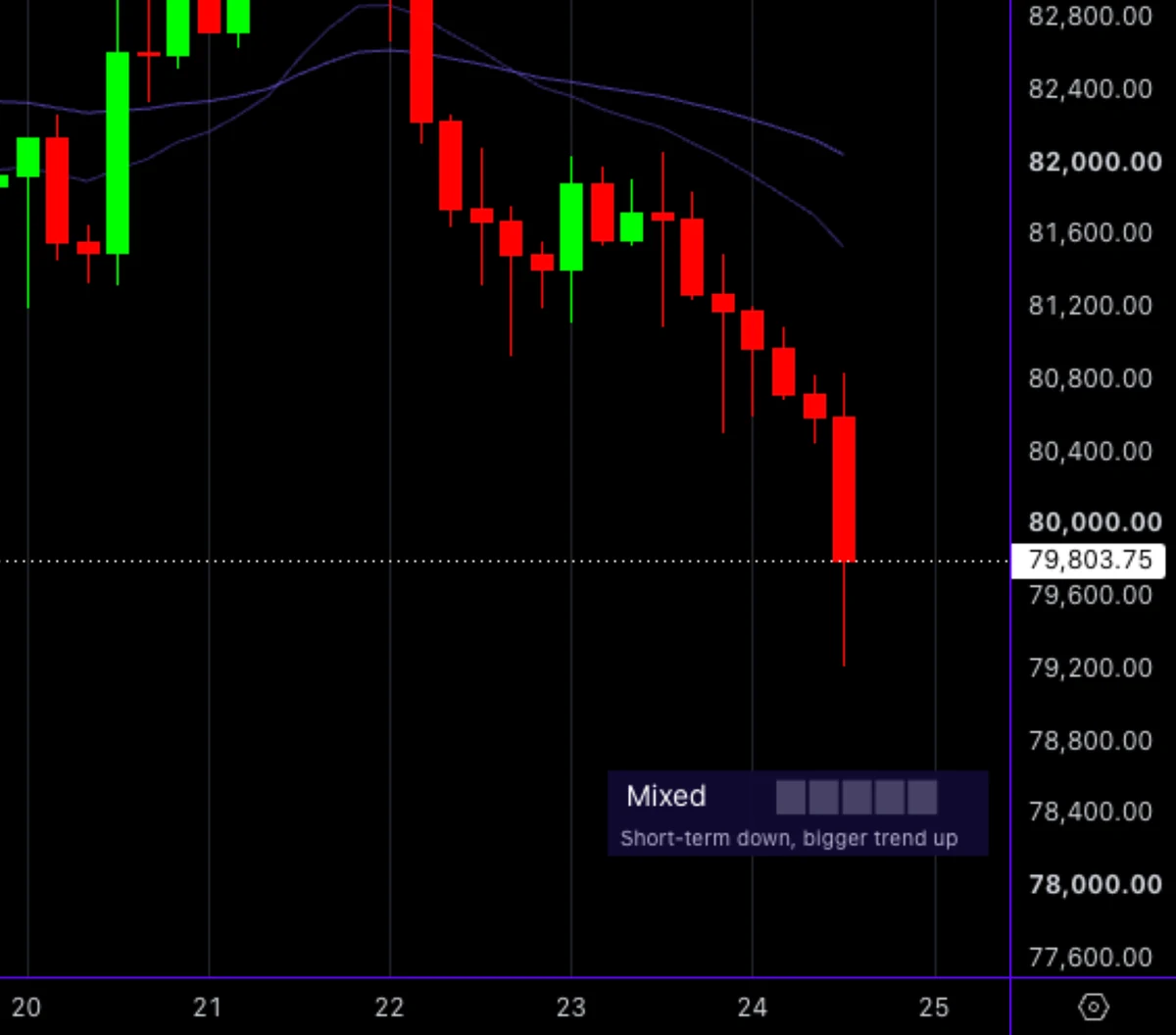
The panel sits at the bottom right of the chart and reads the last closed candle. Line one names the regime, with the probability points and a small count beside it. Line two says how firm the read is, or why there is no trend. Hover the panel and the full read opens in plain words.
Line one: the regime word
A backed trend reads Uptrend or Downtrend: Strong when the read is at its firmest, fading when a read like it usually ends soon. Anything else reads Mixed. Up reads are green and down reads are red, so the side is clear at a glance.
- Strong uptrend, Strong downtrend: a backed trend at its firmest.
- Uptrend, Downtrend: a backed trend, with line two saying how firm it is.
- Uptrend fading, Downtrend fading: a backed trend whose read usually ends soon.
- Mixed: no backed trend on this chart right now.
While a chart has too little history, line one says “Collecting history” instead, and the panel fills in as the chart loads more candles.
The probability points and the count
The meter sits beside the word, green for an up read and red for a down read. It lights only when a read is clearly firm. A small muted count says how many points are lit. It stays blank while there is nothing to grade, for example while the read is Mixed.
Line two: how firm the trend is
On a backed trend, line two turns the points into words: “Reversal unlikely soon”, “Reversal unlikely”, “Trend holding, no edge” or “Reversal risk rising”. The last one sits under an Uptrend fading or a Downtrend fading.
Reversal means this backed trend ending, never a price call. When line two reads “Reversal risk rising”, stop adding to the trend. A trade against it still needs its own setup, its own level and its own stop.
Line two under Mixed: why there is no trend
When the read is Mixed, line two says why. “Short-term down, bigger trend up” means this chart is falling while the bigger picture points up, and its mirror reads the other way round. At other times the bigger picture gives no clear direction. There are no points while Mixed.
In a Mixed read, the playbook is range tactics or patience. The no-trade day is often the professional answer here.
The tape: calm, normal or uncertain
The tape (calm, normal, uncertain) is risk-posture context: it says how big the moves are, not whether the regime will last. Uncertain means be defensive: smaller size, wider stops, suspicious of every signal. Once the tape calms down, you can play aggressive again. A normal tape asks for your standard risk.
The tape lives in the panel’s hover, never as a tint on the chart. When a trend read is not graded at all, the count stays blank and line two shows the tape instead. It then reads “Calm tape”, “Normal tape” or “Uncertain tape, be defensive”.
The gold line
For a few candles after an event, line two turns gold and names it, and the panel’s frame turns gold with it. Each event carries the name of its alert, listed in the alerts section below. Then line two returns to the read.
The hover
Hover the panel and the full read opens: the regime in words, the tape and what it asks of you, and the points. Every hover ends with the reminder that the points grade the read, never where price goes.
What do the probability points mean, and what do they not mean?
Probability points describe how firmly a regime read like the one on screen has persisted in the past, never where price goes. The meter lights when a read is clearly firm, more points mean a firmer read, and an unlit meter means no edge.
MCP Regime Ribbon grades each regime read with a machine-learning model inside, on the charts where the research confirmed it. There are no points while Mixed, because there is no backed trend to grade. On a backed trend, an unlit meter is still an answer: line two says whether the trend is holding or fading.
Three things the points are not. They are not a forecast of direction or a price target. They are not a promise about the next candle. And they are not an entry or an exit on their own: they grade the read, and your plan does the rest.
Which alerts can you set?
Six alerts are built in, and five of them carry the names of the gold events on the panel. Like the panel, they read the last closed candle. Set them to Once per bar close in the TradingView alert dialog, then open the chart when one fires and read the panel.
- Regime turned up and Regime turned down: a regime earned its points, the moment the dot appears.
- Regime ended: a backed trend that carried points gave way to Mixed.
- Tape turned calm: you can play aggressive again.
- Tape turned uncertain: be defensive, with smaller size and wider stops.
- Any regime event: one alert for the regime turning up, turning down or ending.
Every alert message ends with the same line: education, not financial advice. An alert says that the regime or the tape changed. What you do about it stays your decision.
How do you use it in a trade?
The ribbon is the first layer under every other tool. It does not pick entries. It tells you which kind of entry fits this chart, and how hard you may press. Read it before your levels and your other indicators, and let it rule out the tactics that do not fit.
- Read line one: a backed trend, a fading one, or Mixed.
- Pick the tactic family: trend tactics in a backed trend, range tactics or patience in Mixed.
- Read the tape in the hover: calm, normal or uncertain.
- Find your setup with your other tools, such as MCP RSI Intelligence, inside that frame.
- Size for the tape, and write your invalidation before you enter.
In a Strong uptrend or a Strong downtrend, trend tactics fit best, and a trade against the regime needs a very good reason. When the tape is uncertain, be defensive whatever line one says. Your drawdown budget still decides the size, never the points.
What can it not do?
MCP Regime Ribbon names the regime, and that is its whole job. Entries, exits, stops and forecasts stay with you and your plan. Its points grade the read itself, never the next move in price. Use it to choose the tactic that fits the market, then plan the trade as you always do.
- There are no points while Mixed, and that is an answer, not a fault.
- A chart with little history shows Collecting history until enough candles load.
- The regime never sets your size, and the tape never changes the regime.
AI Indicators by MCP
MCP Regime Ribbon is live for PRO Paradisers.
Frequently asked questions
Does MCP Regime Ribbon repaint?
No. It reads on the last closed candle and does not repaint. The ribbon, the dot, the panel and the alerts all settle when a candle closes. What you see in the chart’s history is what the indicator showed at the time. Education, not financial advice.
What does Reversal risk rising mean?
It means a read like the one on screen usually ends soon. The backed trend is still in place, but it is fading. Reversal means this backed trend ending, never a price call. Stop adding to the trend, keep the plan you already wrote, and let your levels decide the rest.
Why is there no ribbon on part of my chart?
Because the ribbon only shows where the read carries probability points. While the read is Mixed, or a backed trend carries no points, the chart stays clean and the panel still names the regime. A soft band returns once a regime earns its points, and a small dot marks that candle.
How is MCP Regime Ribbon different from a moving-average cross?
A cross only tells you that two lines crossed, on this chart alone. The Regime Ribbon tells you whether this is a trend worth leaning on, how firm it is, and when it is fading. It also reads the tape separately, so you know how hard to press.
What does an uncertain tape mean for a trade?
It means the market is moving unusually much. Be defensive: smaller size, wider stops, and suspicion of every signal. The tape says how big the moves are, not whether the regime will last, so a backed trend can still hold. Once the tape calms down, you can play aggressive again.
Crypto trading involves substantial risk and is not suitable for everyone. Nothing here is financial advice; it is education only. Never risk more than you can afford to lose.









Join the discussion
No comments yet. Members, share how you are reading this.