

In short
MCP Absorption Detector V2 is a TradingView indicator from AI Indicators by MCP. It marks the moment heavy one-sided pressure meets a level the chart has respected and price refuses to continue. It names two reads: Selling absorbed at support and Buying distributed at resistance. On the charts the research covers, it grades each read with probability points from 0 to 5, and only reads with points are drawn. The panel at the bottom right names every read. It works on any chart with volume, with nothing to set. Use it as context for a trade you already have a reason for, never as an entry on its own.
What is MCP Absorption Detector V2?
MCP Absorption Detector V2 is an indicator in AI Indicators by MCP, built by the ParadiseTeam and included with PRO Paradiser. It sits on the price chart and speaks only when heavy pressure meets a level the chart has respected while price refuses to continue. Between those moments, a small panel describes the flow in plain words.
What is different here
Most absorption and volume indicators plot a flow line and leave the reading to you. This one speaks only at the moment that matters and grades that moment with probability points. It keeps the chart clean: one label, one shaded level, one small panel.
It answers the flow question on the AI Indicators page: who is pushing right now, and is it working? Absorption is the moment a push stops working at a level. New to the idea itself? The free class on absorption in trading explains it without any tool.

How do you add MCP Absorption Detector V2 to your chart?
MCP Absorption Detector V2 is an invite-only script on TradingView, included with PRO Paradiser. A free TradingView account is enough. Once the ParadiseTeam has added the script to your account, it appears under invite-only scripts in the Indicators menu. It works on any chart with volume, spot charts included.
- Join PRO Paradiser, the membership that includes the indicator.
- Leave your TradingView username on your members’ page.
- The ParadiseTeam adds the script, usually within a day.
- On TradingView, open Indicators, then Invite-only scripts.
- Add MCP Absorption Detector V2 to any chart with volume.
There are no inputs to set. Everything that decides a read is fixed, so every member sees the same read on the same chart. It overlays the price chart itself, so keep the timeframe you already trade.
What does it draw on the chart?
On a graded chart, every mark belongs to a read with probability points. A short label names the read with its points, and the label’s arrow marks the verdict candle. A shaded zone marks the level in play. If price later closes beyond the zone, a small cross marks that candle.
- The label: the read and its points, such as “Selling absorbed at support 2 of 5”. It sits green under a support or red above a resistance, and its arrow points at the verdict candle.
- The shaded zone: a band in the same colour around the level in play. A dotted line inside it marks the level itself.
- The small triangle: a second read close by on the same side gets a tiny triangle on its candle instead of a second label.
- The cross: red under a lost support, green over a reclaimed resistance. A read that held simply ends with its zone.
The zone starts at the candles that pressed into the level and runs forward while the read is carried. It deepens with the points, so a stronger read looks stronger at a glance. Scroll back and every drawn read shows its points and what happened next.
Everything is decided on closed candles. The candle still forming never adds, removes or moves a mark.
Why are some reads not drawn?
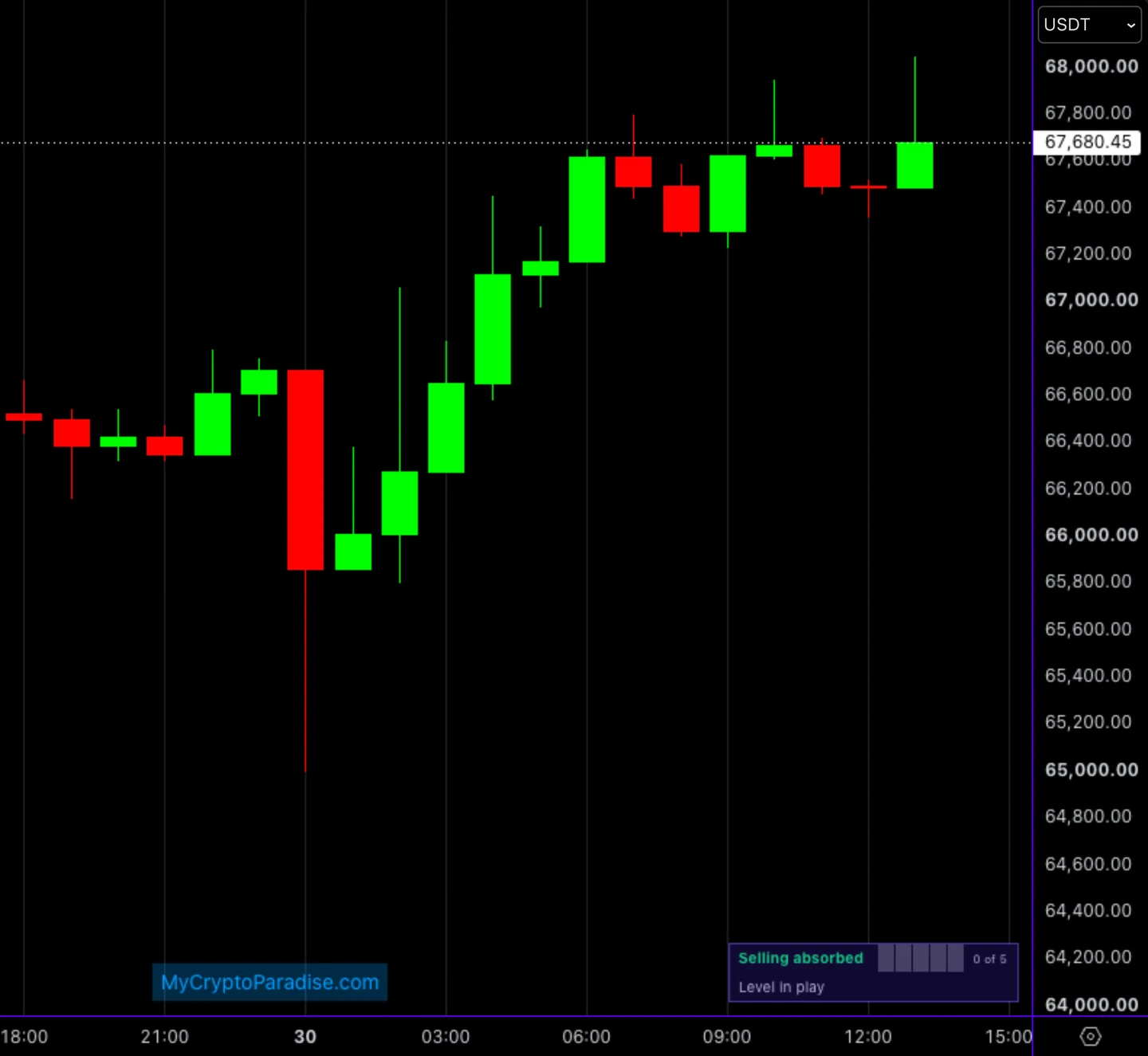
Because the chart carries only what earned attention. A read with no points draws nothing, while the panel still names it: Selling absorbed, the meter unlit, 0 of 5, and Level in play. A level like this one has held about as often as a typical one, so it is described, not graded.
Two more rules keep the chart readable. When drawn reads on one side come close together, only the first carries the label. Each later one gets a small triangle instead, and its own zone. On a chart or side the research could not grade, every read is drawn with its words, since nothing is graded there.
How do you read the status panel?
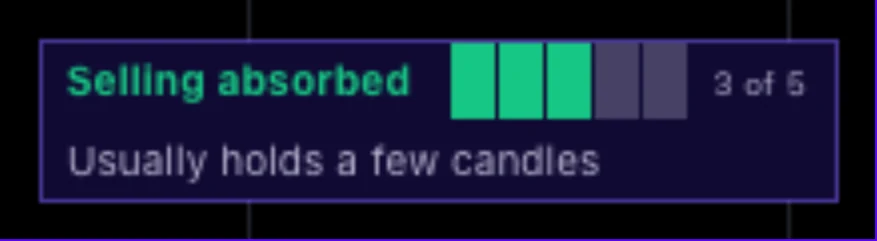
The panel at the bottom right reads the last closed candle in two lines and a meter. Line one names the read. The five probability points grade it, with a small count beside them. Line two says what to expect in plain words. Hover any part of the panel for the full reading.
Line one: the read
Line one reads Selling absorbed in bold green while an absorbed-selling read is carried. It reads Buying distributed in bold red while a distributed-buying read is carried. It reads No edge when no read is carried, and Collecting history while a fresh chart loads.
The probability points and the count
Five small blocks sit beside line one. They light green for absorbed selling and red for distributed buying, and only when the read carries points. The small count beside them gives the number, such as 2 of 5. It stays blank when no read is carried, and on a chart or side that is not graded.
Line two: what to expect
With points, line two turns the grade into words, and more points mean a firmer read. From the firmest it says Usually holds several candles, Usually holds a few candles, or May hold a candle or two. A read without points says Level in play: it is described, not graded.
Between reads, line two describes the flow instead:
- “Selling pressing at a level” or “Selling pressing, no level”.
- “Buying pressing at a level” or “Buying pressing, no level”.
- “Balanced flow” when neither side presses hard.
Pressure at a level is not a read yet. It becomes one only when price refuses to continue at the level. For a few candles after an event of a drawn read, line two turns gold and names it. The four events are Selling absorbed at support, Buying distributed at resistance, Support lost and Resistance reclaimed.
The hover
Hover line one, line two or the meter for the full reading: what the read means, what its points say and what would end it. Every hover ends on the same reminder. The read describes pressure absorbed at a level, never who absorbed it, and it is not an entry or exit call.
What do the probability points mean, and what do they not mean?
The points answer one question: how firmly has an absorbed level like the one on screen held in the past? More points mean a firmer history. MCP Absorption Detector V2 grades each absorbed or distributed level with a machine-learning model inside, on the charts where the research confirmed it.
Zero points is a complete answer. A level like this one has held about as often as a typical one, so the read is described, not graded. The words and colours describe the read, never price. As the hover puts it: past behaviour, not a promise.
Probability points appear on five timeframes: 5m, 15m, 1h, 4h and daily. On the weekly chart and other timeframes, each read is drawn with its words and the count stays blank.
Reads that carry points held clearly more often than a typical absorbed level, on coins the research never saw. A lit meter earned its place, yet it is still not a reason to trade on its own.
When does a read end?
A read lives inside its shaded zone. It ends when a candle closes beyond the zone’s far edge, or after a while on its own, and the zone ends there too. A newer read replaces the one before it. The hover names the end in advance: a candle closing beyond the shaded zone on the far side.
When a drawn read ends on a close beyond its zone, line two names it in gold, and a small cross marks that candle. It reads Support lost after an absorbed support and Resistance reclaimed after a distributed resistance. A lost level is as much information as the absorption was.
Which alerts can you set?
Five alerts are built in, and they fire only for drawn reads and their breaks. Most traders need one: Any absorption event covers the other four. Set every alert to Once per bar close, so it fires on a confirmed candle, then check price structure and the level in play.
- “Selling absorbed at support” and “Buying distributed at resistance”.
- “Support lost after absorption” and “Resistance reclaimed after distribution”, the moments of the crosses.
- “Any absorption event”, for all four at once.
An alert tells you that something happened on the chart, nothing more. A TradingView alert also keeps the script version it was created with, as TradingView’s alerts FAQ explains, so create your alerts again after an update.
How do you use it in a trade?
Use it as context for the tactic you already trade. It is a layer of evidence for your own method, not a signal service. Keep the timeframe you already use, and give a read the most weight at a level that already matters on your chart.
- Mark your levels first: the support, resistance or range edge in play.
- When a read appears there, check line one, the points and line two.
- Watch the following candles: is price accepted beyond the level, or does it give way?
- Let the points set your attention, never your position size.
- Write your invalidation and size before any entry, from your own risk plan.
The indicator gives no entries, exits, stops or position sizes, and that is deliberate. Your levels and your risk budget carry the decision, so a light read never gets a strong read’s size. If the levels themselves are new to you, start with marking a trading range and its edges.
What can it not do?
It never tells you who absorbed the pressure, how much they hold, where price goes next, or when to enter or exit. It describes pressure meeting a level on closed candles, and how firmly levels like it have held before. Markets change, and past behaviour is not a promise.
- A fresh chart shows Collecting history until enough candles load. Scroll back once and it clears.
- A long silence is normal: nothing heavy met a respected level with a refusal.
- The zone is sized for each chart, so it means the same on every coin.
AI Indicators by MCP
MCP Absorption Detector V2 is live for PRO Paradisers.
Frequently asked questions
Does MCP Absorption Detector V2 tell you when to buy or sell?
No. It marks the moment heavy pressure met a level the chart has respected and price refused to continue. An absorbed support is not a buy signal, and a distributed resistance is not a sell signal. The entry, the stop and the size stay yours, inside your own plan.
Why does the panel name a read when nothing is drawn on the chart?
Because a read with zero points is not drawn. Selling absorbed with 0 of 5 and Level in play means a level like this one has held about as often as a typical one. The panel still names it, so you know a level was tested. That is the rule working, not a missing mark.
Which timeframes show probability points?
Five: 5m, 15m, 1h, 4h and daily. On the weekly chart and other timeframes, reads are described, not graded: each is drawn with its words, and the count stays blank. Hover the panel on any chart and it tells you whether that chart carries points.
Does MCP Absorption Detector V2 repaint?
No. Every verdict is decided on a closed candle, and the labels, the marks and the zones never repaint. The candle still forming never adds, removes or moves a mark. What you see in the chart’s history is what would have shown at the time, so a scroll back is a fair record.
Does it work on altcoins and spot charts?
Yes. It works on any chart with volume, spot charts included, and there is nothing to set. The shaded zone is sized for each chart, so it means the same on every coin. A fresh chart shows Collecting history until enough candles have loaded, then the panel starts reading.
Crypto trading involves substantial risk and is not suitable for everyone. Nothing here is financial advice; it is education only. Never risk more than you can afford to lose.










Join the discussion 2
Oh, this is super helpful! I always wondered about the shaded zone... My pupils at home are usually just green or red, so this is much more nuanced for my tiny positions. 😅
Haha I used to think the shaded zones were just for fun, like a chill background vibe 😎😅 but it makes sense now why I was always buying at the top 🤦♂️ gotta respect the data! 🔥