

KuCoin Deposits
In short
Depositing crypto into KuCoin involves transferring digital assets from an external wallet or another exchange to your KuCoin account. This process is necessary to enable trading activities such as spot, futures, or margin trading on the platform. KuCoin supports deposits for a wide range of cryptocurrencies.
Since the introduction of cryptocurrency to the world, millions of users globally have profited from this highly volatile market. So, it is no surprise that other people are constantly adopting the use of cryptocurrency and investing in it. A report shows that about 300,000 new users enter the crypto space daily based on the creation of new blocks and unique addresses receiving or sending crypto.
Therefore, if you are new to cryptocurrency one thing you must know is how to deposit your desired crypto token into a crypto exchange. Some exchanges allow users to deposit in fiat and then convert to crypto on their platform. But knowing the process of depositing crypto would save you lots of trouble later now.
Thus, this article will provide a step-by-step guide on how to deposit crypto into KuCoin exchange. KuCoin is one of the largest crypto exchanges globally with various means for users to trade and invest in top crypto assets. KuCoin also lists lots of lesser-known tokens with a large margin for profit. So, to trade futures, margin, spot and others on KuCoin you would need to deposit crypto into your main account. Therefore, if you are a new crypto user then this guide is for you. If you are not new to the crypto space, then this article will help expand your knowledge on how to use KuCoin exchange.
Here is an opportunity you should not miss;
- My Binance Paradise, https://t.me/MCP_binance
- My KuCoin Paradise, https://t.me/MCP_KuCoin
Step-By-Step Guide to Deposit Crypto into KuCoin Exchange
Although KuCoin is renowned for its user-friendly platform, which means that depositing is quite straightforward on the crypto exchange. There are some mistakes to avoid for quick processing of users’ deposits and to ensure that your deposit is secure.
How to Deposit Crypto in KuCoin Website
To use KuCoin web platform, go to KuCoin.com and sign in to your account or create an account if you’re a new user. After this, click on the ‘Asset’ icon at the upper right corner of the screen. This step would bring a navigation menu to the top of your screen. Identify where ‘Deposit’ is placed and select it.
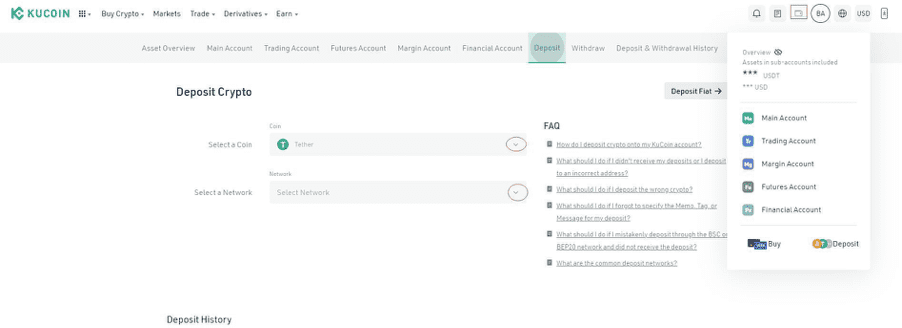
After clicking on ‘Deposit’, a text field will appear for you to deposit crypto. In this step, you are to choose the coin (crypto asset) you want to deposit from the drop-down menu. Ensure that you only have the coin you desire to deposit from your withdrawal platform.
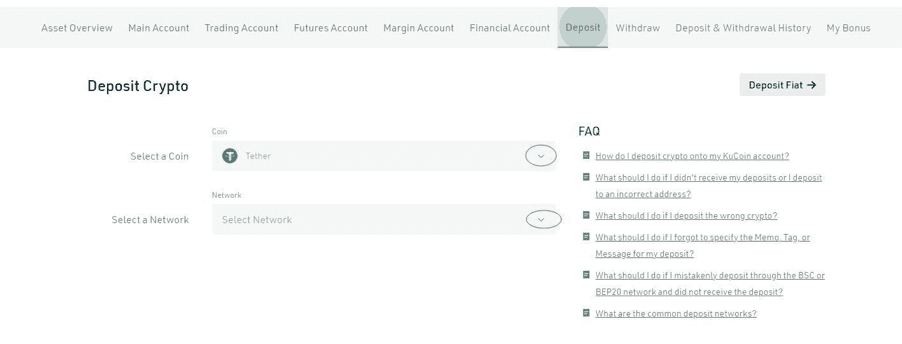
After selecting the coin, select a corresponding network to the coin. Your deposit address will pop up, copy it and paste it to the platform you want to withdraw from.
But if it is your first time depositing, you need to first activate your deposit address. Also, if the coin you want to deposit requires a Memo, Payment ID, Tag, or any Message. Please ensure that all information is correct to prevent the loss of your assets.
How to Deposit Crypto in KuCoin Mobile App
Open KuCoin mobile app on your phone. If you are not signed in to your account, sign in or create a new account. Then, navigate to the ‘Asset’ tap at the bottom right corner and click on it. After that, select the ‘Deposit’ tab at top of the screen.
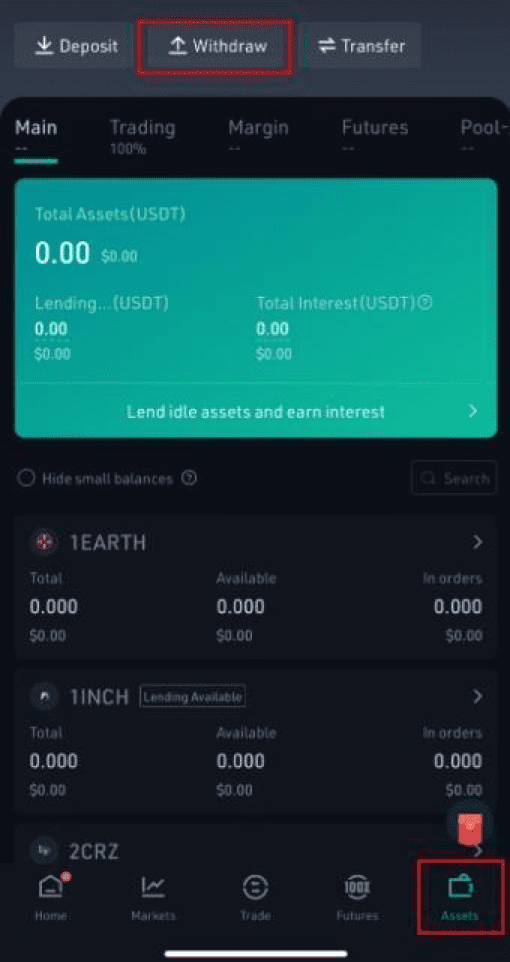
This will open up the deposit page, where you’ve to choose the coin you want to deposit from the list. After this, select the account you want to deposit into. KuCoin has various accounts such as the main account, trading account, futures account, margin account, etc. So, choose the account you want your crypto funds to go to. Then, copy the deposit address that appears and paste it into your withdrawal platform (that is, the crypto platform you are depositing the funds from).
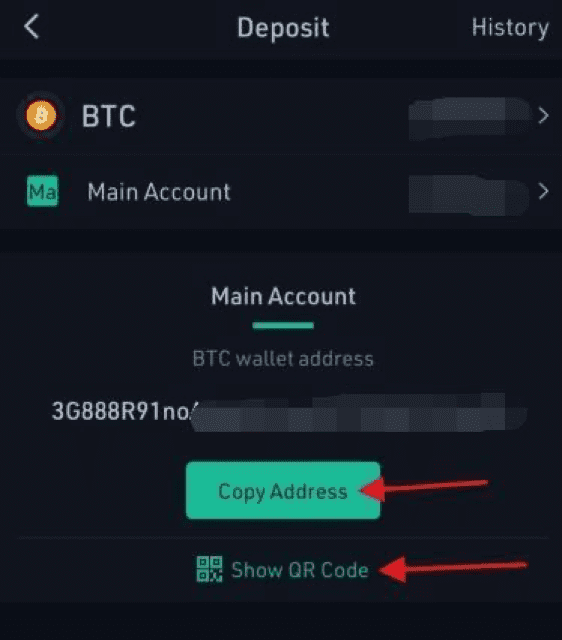
In summary, the process of depositing crypto into KuCoin is quite simple, but you need to note certain things. If you send crypto to the wrong deposit address (not the one KuCoin provides) your funds will not appear in your account in KuCoin and KuCoin may be unable to recover such assets. Also, if you forget to include the Memo, Tag, or Message for coins which require such, your funds won’t appear in KuCoin. Often deposit in KuCoin through the app or Web takes a few minutes to reflect in your account, but this depends on the quantity and type of coin deposited. So, go ahead and enjoy your crypto experience on KuCoin.
What is different here
Most guides stop at the theory. The MyCryptoParadise team shares the live trades, and the reasoning behind each one, inside ParadiseFamilyVIP. Everything here is education, not financial advice.
Crypto trading involves substantial risk and is not suitable for everyone. Nothing here is financial advice; it is education only. Never risk more than you can afford to lose.









Join the discussion
No comments yet. Members, share how you are reading this.